
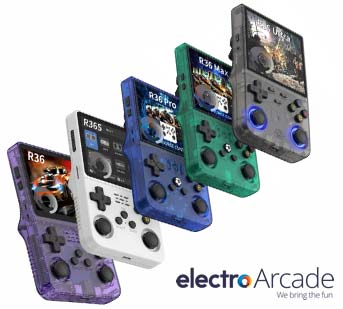
R36 handheld: Game Console Comparison
Electro Arcade · Buyer’s Guide
R36 Series: Models
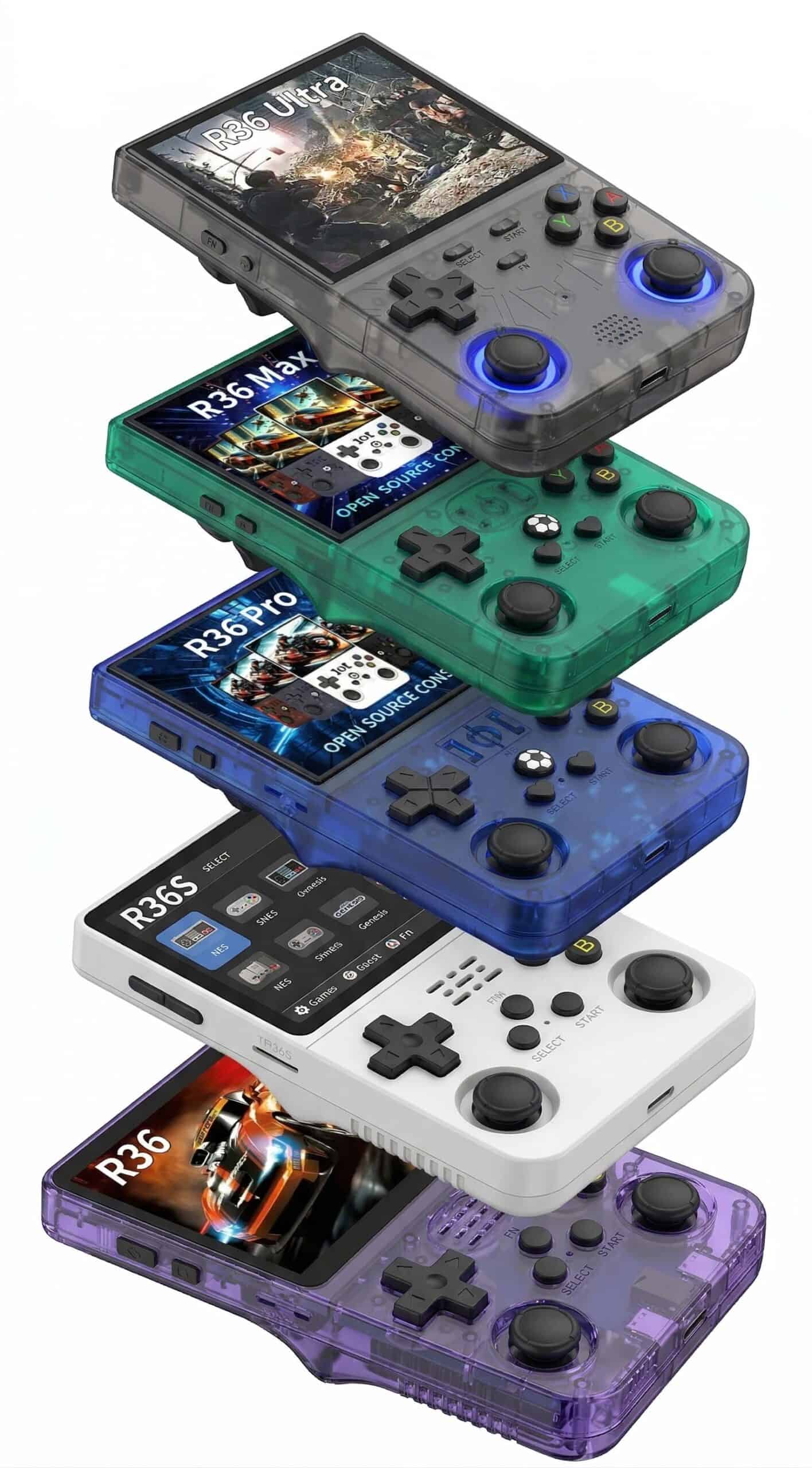
The R36 name now covers six different handhelds – R36, R36S, R36 Pro, R36 Max, R36 Ultra and R36H Pro Max – and the model names alone don’t tell you which of these retro gaming consoles is worth buying. They share the same RK3326 processor, but differ enough in shape, controls, screen size, Wi-Fi, and storage that the right pick depends entirely on you. This guide breaks down the specs, emulation range, and Australian pricing for all six, model by model, so you can choose the correct R36 handheld console for you.
Quick answer: every R36 plays the same games, so pick by how you like to hold it. Want a bigger 4:3 screen and a horizontal grip? Get the R36H Pro Max. Prefer a compact vertical handheld? Get the R36 Ultra. For drift-free sticks on a 3.5″ screen, get the R36 Pro, or the R36S if price is all that matters.
R36
R36
Original model
Entry-level. No analog sticks — strictly 8-bit and 16-bit gaming. Smallest and lightest of the range.
★★★★★
R36S
R36S
Released Oct 2023
The model that put R36 on the map. Adds dual analog sticks and handles everything up to PS1. Most affordable entry point.
★★★★★
R36 Pro
R36 Pro
Released 2024
R36S with hall-effect sticks that won’t drift over time. Better ergonomics and a bigger battery. Best 3.5″ choice for PS1 and N64.
★★★★★
R36 Max
R36 Max
Released Nov 2024
R36 Pro specs in a larger 4″ body. Right choice if you want the bigger square screen but don’t need Wi-Fi.
★★★★★
R36 Ultra
R36 Ultra
Released 2024–2025
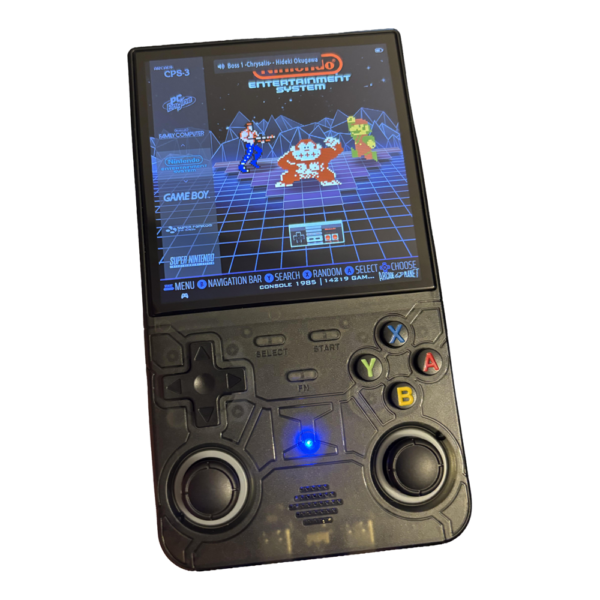
The R36 Ultra is one of the two most complete models. Wi-Fi, tempered glass screen, and RetroAchievements support.
★★★★★
R36H Pro Max
R36H Pro Max
Horizontal model
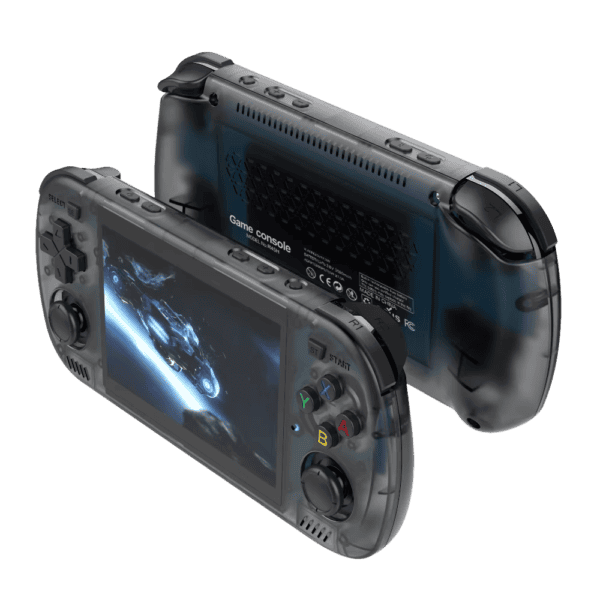
The R36H Pro Max is the only horizontal R36: a bigger 4.2″ 4:3 screen between wide grips, Wi-Fi, two front-facing speakers and ArkOS.
★★★★★
Form factor & controls
| Feature | R36 | R36S | R36 Pro | R36 Max | R36 Ultra | R36H Pro Max |
|---|---|---|---|---|---|---|
| Orientation | Vertical | Vertical | Vertical | Vertical | Vertical | Horizontal |
| Analog sticks | None | Standard dual | Hall-effect dual | Standard dual | 3D dual w/ RGB | Standard dual |
| Clickable sticks | No | Yes | Yes | Yes | Yes | Yes |
| Drift risk | N/A | Standard | Drift-free | Standard | Standard | Standard |
| Shoulder buttons | Basic | Spring-loaded | Enhanced L/R | Enhanced L/R | Spring-loaded L/R | L1/R1 + trigger-shaped L2/R2 |
| ABXY buttons | Standard | Standard | Tactile, improved rebound | Improved tactile | Mechanical | Standard |
Every R36 model runs the same RK3326 chip, so the jump from no sticks (R36) to dual sticks (every other model in the table above) isn’t cosmetic — at this hardware’s performance ceiling, it decides whether entire parts of the library work at all:
- N64 and PS1 camera control. The right stick enables proper N64 C-button mapping — needed for Super Mario 64 or Ocarina of Time — and restores dual-stick control on PS1 titles like Ape Escape and Alien Resurrection. On the base R36, these are unplayable, not just awkward.
- PortMaster and arcade twin-stick ports. RK3326 handhelds lean on PortMaster for native Linux ports — Undertale, Celeste, Half-Life, AM2R — and twin-stick arcade shooters like Smash TV and Robotron need dual analogue input to function at all.
Screen
| Feature | R36 | R36S | R36 Pro | R36 Max | R36 Ultra | R36H Pro Max |
|---|---|---|---|---|---|---|
| Size | 3.5″ | 3.5″ | 3.5″ | 4″ | 4″ | 4.2″ |
| Resolution | ~480p | 640×480 | 640×480 | 720×720 | 720×720 | 1024×768 |
| Aspect ratio | 4:3 | 4:3 | 4:3 | 1:1 square | 1:1 square | 4:3 |
| Panel type | IPS | IPS OCA laminated | IPS | IPS | IPS tempered glass | IPS OCA laminated |
| Best for | All 4:3 systems | All 4:3 systems | All 4:3 systems | GBA, GBC, NeoGeo Pocket | GBA, GBC, NeoGeo Pocket | All 4:3 systems |
Battery & charging
| Feature | R36 | R36S | R36 Pro | R36 Max | R36 Ultra | R36H Pro Max |
|---|---|---|---|---|---|---|
| Capacity | ~2500 mAh | 3000–3200 mAh | 4000 mAh | 4000 mAh | 3000 mAh | 3000 mAh |
| Rated life | 4–5 hrs | 3–4 hrs | ~6 hrs | 6–8 hrs | ~6 hrs | ~6 hrs |
| Charging | USB-C | USB-C | USB-C | USB-C | USB-C (5V/2A, ~2 hrs) | USB-C (5V/2A, ~2 hrs) |
Connectivity
| Feature | R36 | R36S | R36 Pro | R36 Max | R36 Ultra | R36H Pro Max |
|---|---|---|---|---|---|---|
| Wi-Fi | No | No | No | No | 2.4 GHz | 2.4 GHz |
| Bluetooth | No | No | No | No | No | No |
| USB-C data | Charge only | Yes | Yes | Yes | Yes | Yes (separate OTG port) |
| RetroAchievements | No | No | No | No | Yes (via Wi-Fi) | Yes (via Wi-Fi) |
| OTA updates | No | No | No | No | Yes (via Wi-Fi) | Yes (via Wi-Fi) |
| Wireless file transfer | No | No | No | No | Yes (via Wi-Fi) | Yes (via Wi-Fi) |
Storage
| Feature | R36 | R36S | R36 Pro | R36 Max | R36 Ultra | R36H Pro Max |
|---|---|---|---|---|---|---|
| Internal storage | None | None | None | None | None | None |
| Card slot | MicroSD | MicroSD | TF (up to 256 GB) | TF (up to 256 GB) | TF (up to 512 GB) | Dual microSD |
| Ships with | — | 64 GB | 64 GB | 64–128 GB | 100 GB | 100 GB |
| Split OS/game storage | No | No | No | No | No | Second slot free |
Audio
| Feature | R36 | R36S | R36 Pro | R36 Max | R36 Ultra | R36H Pro Max |
|---|---|---|---|---|---|---|
| Speakers | Mono | Single | Dual stereo | Dual, down-firing | Single (centre) | Dual, forward-facing |
| Headphone jack | 3.5 mm | 3.5 mm | 3.5 mm | 3.5 mm | 3.5 mm | 3.5 mm |
Operating system & firmware
| Feature | R36 | R36S | R36 Pro | R36 Max | R36 Ultra | R36H Pro Max |
|---|---|---|---|---|---|---|
| Default OS | EmuELEC | EmuELEC | EmuELEC | EmuELEC or ArkOS | EmuELEC | ArkOS |
| Custom firmware | ArkOS, AmberELEC | ArkOS, AmberELEC, ROCKNIX | EmuELEC, ROCKNIX | EmuELEC, ROCKNIX | EmuELEC, ROCKNIX | ArkOS preinstalled |
| Panel variants | — | 6+ variants — verify before flashing | — | — | — | — |
Emulation range
| System | R36 | R36S | R36 Pro | R36 Max | R36 Ultra | R36H Pro Max |
|---|---|---|---|---|---|---|
| 8/16-bit (NES, SNES, Mega Drive, GBA) | Excellent | Excellent | Excellent | Excellent | Excellent | Excellent |
| PlayStation 1 | Impractical — no sticks | Good | Good | Good | Good | Good |
| Nintendo 64 | Impractical | Hit and miss | Hit and miss | Hit and miss | Hit and miss | Hit and miss |
| Dreamcast | No | Light titles only | Light titles only | Light titles only | Light titles only | Light titles only |
| PSP | No | Hit and miss | Hit and miss | Hit and miss | Hit and miss | Hit and miss |
| Sega Saturn | No | Non-functional | Non-functional | Non-functional | Non-functional | Non-functional |
The table above is the RK3326’s real ceiling — solid PS1, hit-and-miss N64, light Dreamcast and PSP titles only. Within that ceiling, the second stick keeps paying off well past the games themselves:
- Quick-menu access without a modifier hold. Single-stick devices need a Select+Start-style combo to reach the RetroArch quick menu for save states or exit. With a second stick, L3/R3 clicks toggle it directly — no two-hand fumble mid-game.
- EmuELEC, ArkOS, and ROCKNIX hotkey shortcuts. Custom firmware maps the right stick to volume, brightness, and fast-forward without opening a menu overlay at all.
- A backup once the D-pad wears. The D-pad is usually the first part to fail under heavy 2D use — fighting games, diagonal-heavy platformers. A mapped, deadzone-tuned left stick gives you a fallback once it starts double-inputting or drifting.
Clone device warning
The R36 name is open-source hardware. Devices bearing the R36 name but running the Allwinner F1C200S chip — including the R36S Plus, R36HD, GA36, and PS202 — have no custom firmware support and significantly weaker performance. The R36S Plus is the most commonly encountered: poor D-pad, weak software, wrong chip. Avoid these variants.
Australian price guide
Prices across the R36 range vary by model and retailer, and can shift frequently on platforms like AliExpress and Amazon AU. As a general guide, expect to pay anywhere from around $60 for the base R36 up to $109 for the R36H Pro Max. The R36S typically sits around $69–79, with the Pro and Max falling in between, depending on the seller and shipping method. Dual analogue sticks and a 100GB card at $99 is rare — that combination typically starts closer to $150 elsewhere. The R36 Ultra and R36H Pro Max handheld consoles are available locally through Electro Arcade with fast Australian shipping and a warranty.
Which model should you choose?
R36
Choose the R36 if you want the smallest, lightest device possible and your gaming library stops at 16-bit. If SNES, Mega Drive, and GBA are all you need, the R36 delivers them in a genuinely pocketable form. The moment you want PS1 or anything requiring analog input, this model runs out of road.
R36S
Choose the R36S if budget is your primary consideration. It is the most affordable model with dual analog sticks, handles everything up to PS1 reliably, and has the broadest custom firmware support of the range. It is also the right choice if you want to experiment with ROCKNIX or ArkOS — the community knowledge base around this specific model is larger than any other R36 variant.
R36 Pro
Choose the R36 Pro if you plan to play PS1, N64, or anything that demands sustained analog stick use. Hall-effect sticks are the defining upgrade — they eliminate drift by design, which matters when standard sticks on devices like the R36S begin to wander after heavy use. The larger battery and improved ergonomics are meaningful bonuses. If you want a 3.5″ screen and intend to keep the device for years, the Pro is the smarter long-term buy over the R36S.
R36 Max
Choose the R36 Max if you want a larger, sharper screen but have no need for Wi-Fi. The 4″ 720×720 square panel is a genuine visual upgrade, particularly for GBA, GBC, and Neo Geo Pocket titles that fill the screen natively without stretching. It carries the same battery and control quality as the R36 Pro. If you are choosing between the Max and the Ultra and Wi-Fi is not important to you, the Max is the practical choice.
R36 Ultra
Choose the R36 Ultra if you want the most complete package in the range. The 2.4 GHz Wi-Fi is the feature that sets it apart — it enables RetroAchievements tracking, wireless ROM transfers, and optional firmware downloads without touching a card reader. The tempered glass 4″ screen rounds out a device that punches well above its price point. Build quality won’t match Anbernic’s higher-tier aluminium shells, but at this price that isn’t the trade-off you’re paying for.
R36H Pro Max
Choose the R36H Pro Max if you want a bigger 4:3 screen and a horizontal grip. The 4.2″ 1024×768 panel shows arcade, 16-bit and PlayStation games full width with no bars down the sides, the wide grips stay comfortable over long sessions, and two forward-facing speakers point the sound at you. It has Wi-Fi like the Ultra and ships with ArkOS on a 100 GB card.
The R36 Ultra is a solid entry point, but if you’re ready to level up, Electro Arcade has you covered. From Anbernic to Trimui and Mangmi, we stock a range of powerful retro handhelds to suit every player and budget. Browse our Anbernic handheld consoles or explore our full range of Retro gaming handhelds shipped from Australia – backed by a local warranty and fast Australian shipping.
R36H Pro Max vs R36 Ultra side by side
Same chip, same Wi-Fi and the same 100GB games card inside. The difference is how they sit in your hands: the R36H Pro Max is wide with a bigger 4:3 screen, the R36 Ultra is a pocket-size vertical with a square screen.
| Horizontal, bigger screen4.2″ → PSPR36H Pro Max$109On Backorder - from 3+ weeksSee options | Vertical, pocket size4″ 1:1 → PS1R36 Ultra$99On Backorder - from 3+ weeksSee options | |
|---|---|---|
| At a glance | ||
| Plays up to | PSP | PS1 |
| Form factor | Horizontal | Vertical (Game Boy style) |
| Games card | Included | Included |
| Controls layout | D-pad on top | D-pad on top |
| Details | ||
| Brand | - | Retro Console |
| Operating System | Linux | Linux |
| Material | - | ABS Plastic |
| Colours | White, Purple, Black, Blue, Green | Transparent Black, Transparent Purple, White |
| Audio | Two forward-facing speakers | Single Front-Firing Speaker + 3.5mm Headphone Jack |
| Display | ||
| Display Size | 4.2″ | 4.0-inch High-Definition 1:1 Aspect Ratio |
| Technology | IPS, OCA full-laminated | IPS Full-Viewing Angle (Tempered Glass) |
| Resolution | 1024×768 (4:3) | 720 x 720 |
| Chip | ||
| CPU Brand | Rockchip | RockChip |
| CPU Model | RK3326 | RK3326 |
| GPU Brand | ARM | Embedded |
| GPU Model | Mali-G31 MP2 | Mali-G31 MP2 |
| Connections | ||
| USB | USB-C charging port + USB-C OTG port | Dual USB-C (OTG Data + Charging) |
| Audio Out | 3.5mm headphone jack | 3.5mm Socket |
| HDMI | - | No |
| WiFi | 2.4GHz Wi-Fi | 2.4G WiFi |
| Bluetooth | - | No |
| Controls | - | Dual 3D Joysticks, D-Pad, L1/L2 R1/R2 Triggers |
| Battery | ||
| Battery Technology | - | Li-polymer |
| Battery Capacity | 3000mAh | 3000mAh |
| Battery Life | Up to 6 hours | Up to 6 hours |
| Charge / Output | 5V 2A, up to 2hrs to charge | USB charging cable - 5V 2A, up to 2hrs to charge |
| Memory | ||
| RAM | 1GB DDR3 | 1GB DDR3 |
| Storage Capacity | 100GB MicroSD | 100GB MicroSD |
| Storage Expansion | Dual microSD slots. ArkOS and games ship on the 100GB card in the first slot; the second slot is empty. Supports 16GB to 512GB cards. | MicroSD Slot supports up to 512GB |
| Size | ||
| Console Dimensions | 17.5 × 8 × 3 cm | (L x W x H): 14.5 x 9.5 x 2.5 cm |
| Product Weight | 213 g | 220gr |
| See options | See options | |
Not sure which style suits you? Four quick questions find your best match.
R36 FAQs
R36S vs R36 Ultra — which is better?
The R36 Ultra is the better buy unless every dollar counts. Both use the same RK3326 chip, so they play the same games — excellent up to PS1, hit-and-miss on N64. The Ultra adds a bigger 4″ 720×720 tempered-glass screen, 2.4 GHz Wi-Fi (RetroAchievements and wireless transfers), built-in storage for the system with one microSD slot for your games. The R36S has a 3.5″ 4:3 screen and the largest custom-firmware community.
R36 Ultra vs R36 Max — what’s the difference?
They share the same chip and the same 4″ 720×720 square screen; the difference is features versus battery. The R36 Ultra adds Wi-Fi, built-in system storage (one microSD slot for games) and a tempered-glass screen. The R36 Max has a larger 4000 mAh battery (about 6–8 hours versus the Ultra’s 6), dual down-firing speakers, and ships with EmuELEC or ArkOS depending on the seller. If you don’t need Wi-Fi, the Max is the practical pick.
R36H Pro Max vs R36 Ultra – which should I get?
They’re the same machine inside, with the same chip, Wi-Fi and 100 GB games card, so the choice comes down to how you like to play. The R36H Pro Max is horizontal with a bigger 4.2″ 4:3 screen (1024×768), stereo speakers and ArkOS. The R36 Ultra is smaller and vertical, with a square 4″ 720×720 screen, a single speaker and EmuELEC.
Which R36 handheld is best in 2026?
It depends on what you want from it. For Wi-Fi and the most complete package, choose the R36H Pro Max ($109) if you like a horizontal grip, or the R36 Ultra ($99) if you prefer vertical.
What are the R36 Ultra’s specs?
The R36 Ultra has an RK3326 quad-core chip, a 4″ 720×720 IPS tempered-glass screen, 2.4 GHz Wi-Fi, 8 GB of built-in storage for the system and one microSD slot for games (100 GB games card included, up to 512 GB), a 3000 mAh battery (about 6 hours) with USB-C charging (5V/2A, about 2 hours), a single centre speaker and a 3.5 mm headphone jack. It runs EmuELEC.